This blog is moved to
http://amalhashim.wordpress.com

Tuesday, March 9, 2010

ASP.Net Password Input Width Issue

I came across a strange issue with Password input and IE browser. I have set the width property as same as that of the other controls. But while rendering it in IE, the width of Password field was coming as around 10 pixel less than the other control. The best way to get rid of this issue was using CSS.

Before applying CSS I was using the below code

<html xmlns="http://www.w3.org/1999/xhtml" >
<
body>
<
form id="form1" runat="server">
<
table width="25%">
<
tr>
<
td style="width:100%; text-align:left">UserName: </td>
<
td style="width:100%; text-align:left"><asp:TextBox ID="txtUserName" runat="server"></asp:TextBox></td>
</
tr>
<
tr>
<
td style="width:100%; text-align:left">Password: </td>
<
td style="width:100%; text-align:left"><asp:TextBox ID="txtPassword" TextMode="Password" runat="server"></asp:TextBox></td>
</
tr>
</
table>
</
form>
</
body>
</
html>
And in IE it’s coming as

image

Resolution, I have defined the following style
<style type="text/css" >
.TextBox
{
font-family: Arial, Tahoma, Verdana, Calibri;
font-size: 12px;
color: Black;
height: auto;
width: auto;
}
</style>

And modified the HTML as

<html xmlns="http://www.w3.org/1999/xhtml" >
<
body>
<
form id="form1" runat="server">
<
table width="25%">
<
tr>
<
td style="width:100%; text-align:left">UserName: </td>
<
td style="width:100%; text-align:left"><asp:TextBox CssClass="TextBox" ID="txtUserName" runat="server"></asp:TextBox></td>
</
tr>
<
tr>
<
td style="width:100%; text-align:left">Password: </td>
<
td style="width:100%; text-align:left"><asp:TextBox CssClass="TextBox" ID="txtPassword" TextMode="Password" runat="server"></asp:TextBox></td>
</
tr>
</
table>
</
form>
</
body>
</
html>

Now in IE it’s coming as

image

Viola!!!!! issue resolved. Hope this helps.

jQuery A to Z – Part 2

As I promised in this part i am going to cover in depth of how to select/find elements from the DOM. One important thing I want to point out is about jQuery objects. We will use various methods for getting the DOM element. Once we get it, it will be in the form of jQuery object and this object is entirely different from the HTML element. And hence the properties and method will be different.

Selectors start with $() function which basically removes the need for a loop to access the group of elements as the objects are automatically looped and added by jQuery. Some examples

$(‘div’) – get all div elements in the document
$(‘#elementid’) – get all elements in the document having the given id
$(‘.classname’) – get all elements in the document having the class assigned to the given classname

Lets start Part 2 example by creating a website as we discussed in Part 1. Replace the code in default.aspx with the one provided below

<%@ Page Language="C#" AutoEventWireup="true" CodeBehind="Default.aspx.cs" Inherits="Part2._Default" %>

<!DOCTYPE html PUBLIC "-//W3C//DTD XHTML 1.0 Transitional//EN" "http://www.w3.org/TR/xhtml1/DTD/xhtml1-transitional.dtd">
<html xmlns="http://www.w3.org/1999/xhtml">
<head runat="server">
<title>Untitled Page</title>

<script src="jquery-1.3.2.js" type="text/javascript"></script>

<style type="text/css">
.horizontal
{
float: left;
list-style: none;
margin: 10px;
}
</style>
</head>

<script type="text/javascript" language="javascript">
</script>

<body>
<form id="form1" runat="server">
<ul id="os">
<li>Windows
<ul>
<li>DOS</li>
<li>Win 95</li>
<li>Win 98</li>
<li>Win ME</li>
<li>Win XP</li>
<li>Win Vista</li>
<li>Win 7</li>
</ul>
</li>
<li>Unix
<ul>
<li>Unix</li>
<li>Solaris</li>
<li>Linux</li>
</ul>
</li>
</ul>
</form>
</body>
</html>

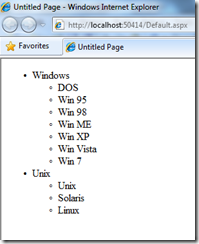
The output of the website will be as follows
image

Now lets apply the Style “horizontal”. Add the below code in your page file.

<script type="text/javascript" language="javascript">
$(document).ready(function() {
$('#os > li').addClass('horizontal');
});
</script>

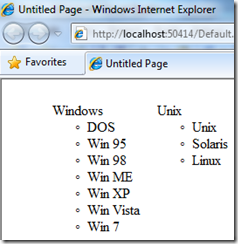
Here we are using the child combinator ( > ) to get all list items that is a child of an element with an ID of os (#os). The output of this query will make the page as follows
image

We can use the negation pseudo-class to identify all list items that do not have a class of horizontal. For that we will be using the following code.

$('#os li:not(.horizontal)').addClass('sub-level');


and the sub-level class will be
.sub-level
{
background-color: Yellow;
}

The jQuery will get all list items that do not have class horizontal, and for those list items it will apply the style sub-level. The output will be as shown below.

image

jQuery supports a set of basic XPath selectors. For selecting attributes jQuery uses XPath selectors. For example, for selecting all div which as width attributes

$('div[@width]')

Another scenario is if we want to get the element which contains another element

$('div[table]')

The above statements will get all the div’s which has a table.
Using XPath we can find if the attribute starts with a string as follows
$('a[@href^="mailto:"')
The above statement will get all anchor tag with attribute href starts with mailto

Similarly for finding the ending with
$('a[@href$=".aspx"')

This will find all anchor tags with href attribute ending with aspx extension
$('a[@href*="domain"')
Above query will find all anchor tags with href attribute containing the string domain anywhere.

All the selectors discussed return a set of elements, from the set if we want to access elements by index, we can use the Custom selector. Similar to array index, the index starts with 0.
$('div.horizontal:eq(0)')
Since CSS index is one based, in CSS selector we must use 1 to get the 1st element.
Two important custom selector included in jQuery are odd and even. For demonstrating this, let’s add a table element to our as shown below.
<table>
<tr>
<td>
SomeData1
</td>
<td>
SomeData2
</td>
</tr>
<tr>
<td>
SomeData3
</td>
<td>
SomeData4
</td>
</tr>
<tr>
<td>
SomeData5
</td>
<td>
SomeData6
</td>
</tr>
<tr>
<td>
SomeData7
</td>
<td>
SomeData8
</td>
</tr>
<tr>
<td>
SomeData9
</td>
<td>
SomeData10
</td>
</tr>
</table>

Include the below style for creating alternate rows

<style type="text/css">
.odd-style
{
background-color: Olive;
}
.even-style
{
background-color: Aqua;
}
</style>
 
Now let’s see how jQuery can apply those styles to the table.

<script type="text/javascript" language="javascript">
$(document).ready(function() {
$('tr:odd').addClass('odd-style');
$('tr:even').addClass('even-style');
});
</script>

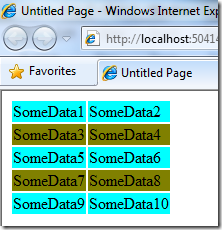
Here is the output
image
The first row index is 0 so its treated as even.

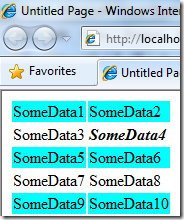
$('td:contains("somedata4")').addClass('bold');

will produce the following output
image
Let’s explore some DOM Traversal methods

$('tr').filter(':odd').addClass('odd-style');
This is another way to traverse the DOM and the impact is same as the statement we used for applying odd-style in previous scenario. I am going to add headers to our table by placing the following to the beginning of the table element.
<tr>
<th>Column1</th>
<th>Column2</th>
</tr>

Now the jQuery is modified as follows
$('th').parent().addClass('heading-style');
$('tr:not([th]):even').addClass('even-style');
$('tr:not([th]):odd').addClass('odd-style');
$('td:contains("SomeData3")').addClass('bold');
1st statement will get the parent of ‘th’ which will be the 1st tr and apply the style heading-style
2nd statement will get all tr even which don’t have a th element and applies the even-style
3rd statement will get all tr odd which don’t have a th element and applies the odd-style
4th statement remains the same as previous but only change is here i am making the 3rd cell bold. This is done to explain the next statement :-)
$('td:contains("SomeData3")').next().addClass('bold');

This will apply the style bold to the next cell following cell which has data “SomeData3”.

Some more samples.

$('td:contains("SomeData3")').siblings().addClass('bold');
$('td:contains("SomeData3")').parent().find('td:gt(0)')
.addClass('highlight');
$('td:contains("SomeData3")').parent().find('td').not(':contains("SomeData3")')).addClass('bold');
$('td:contains("SomeData3")').parent().find('td:eq(1)').addClass(
'bold').end().find('td:eq(2)').addClass('bold');

Hope you reached a level to understand the above statements. Else add it to your website and do some experiments :-)

Add one more column to our table and use the following jQuery

$('td:contains("SomeData3")')  //get every cell containing "SomeData3"
.parent()  //get its parent
.find('td:eq(1)')  //find inside the parent the 2nd cell
.addClass('bold')  //add the "bold" class to that cell
.end()  //revert back to the parent of the cell containing "SomeData3"
.find('td:eq(2)')  //find inside the parent the 3rd cell
.addClass('bold');  //add the "bold" class to that cell

If you want to find the tag name of an element with id “myId”, use the following statement

var myTag = $('#myId').get(0).tagName;
var myTag = $('#myId')[0].tagName;

Both will do the same job. This is the end of part 2. Hope it was a good learning. In part 3 I am planning to explain about Event and jQuery.

Monday, March 8, 2010

Disabling Network using C#

In C# there are several ways to interact with network interfaces. Which include WMI, NetworkInformation Namespace, Win32 API’s etc. In this article I am going to explain, how easily we can query network information's and play with it.
///Check whether network is available or not
bool isNwUp = System.Net.NetworkInformation.NetworkInterface.GetIsNetworkAvailable();

///Get all network cards and display status
System.Net.NetworkInformation.NetworkInterface[] networkCards = System.Net.NetworkInformation.NetworkInterface.GetAllNetworkInterfaces();

foreach (System.Net.NetworkInformation.NetworkInterface ni in networkCards)
{
Console.WriteLine(ni.Name + ": " + ni.OperationalStatus.ToString());
}


Now let’s see how we can enable/disable a network connection. I have written a generic class wrapping all required methods.

/// <summary>
/// This is a generic class for disconnecting TCP connections.
/// This class can be used to
/// 1. Get a list of all connections.
/// 2. Cloas a connection
/// </summary>
public static class DisconnectWrapper
{
/// <summary>
/// Enumeration of connection states
/// </summary>
public enum ConnectionState
{
All = 0,
Closed = 1,
Listen = 2,
Syn_Sent = 3,
Syn_Rcvd = 4,
Established = 5,
Fin_Wait1 = 6,
Fin_Wait2 = 7,
Close_Wait = 8,
Closing = 9,
Last_Ack = 10,
Time_Wait = 11,
Delete_TCB = 12
}

/// <summary>
/// Connection information
/// </summary>
private struct ConnectionInfo
{
public int dwState;
public int dwLocalAddr;
public int dwLocalPort;
public int dwRemoteAddr;
public int dwRemotePort;
}

/// <summary>
/// Win 32 API for get all connection
/// </summary>
/// <param name="pTcpTable">Pointer to TCP table</param>
/// <param name="pdwSize">Size</param>
/// <param name="bOrder">Order</param>
/// <returns>Number</returns>
[DllImport("iphlpapi.dll")]
private static extern int GetTcpTable(IntPtr pTcpTable, ref int pdwSize, bool bOrder);

/// <summary>
/// Set the connection state
/// </summary>
/// <param name="pTcprow">Pointer to TCP table row</param>
/// <returns>Status</returns>
[DllImport("iphlpapi.dll")]
private static extern int SetTcpEntry(IntPtr pTcprow);

/// <summary>
/// Convert 16-bit value from network to host byte order
/// </summary>
/// <param name="netshort">network host</param>
/// <returns>host byte order</returns>
[DllImport("wsock32.dll")]
private static extern int ntohs(int netshort);

/// <summary>
/// //Convert 16-bit value back again
/// </summary>
/// <param name="netshort"></param>
/// <returns></returns>
[DllImport("wsock32.dll")]
private static extern int htons(int netshort);

/// <summary>
/// Close all connection to the remote IP
/// </summary>
/// <param name="IP">IP to close</param>
public static void CloseRemoteIP(string IP)
{
ConnectionInfo[] rows = getTcpTable();
for (int i = 0; i < rows.Length; i++)
{
if (rows[i].dwRemoteAddr == IPStringToInt(IP))
{
rows[i].dwState = (int)ConnectionState.Delete_TCB;
IntPtr ptr = GetPtrToNewObject(rows[i]);
int ret = SetTcpEntry(ptr);
}
}
}

/// <summary>
/// Close all connections at current local IP
/// </summary>
/// <param name="IP">IP to close</param>
public static void CloseLocalIP(string IP)
{
ConnectionInfo[] rows = getTcpTable();
for (int i = 0; i < rows.Length; i++)
{
if (rows[i].dwLocalAddr == IPStringToInt(IP))
{
rows[i].dwState = (int)ConnectionState.Delete_TCB;
IntPtr ptr = GetPtrToNewObject(rows[i]);
int ret = SetTcpEntry(ptr);
}
}
}

/// <summary>
/// //Closes all connections to the remote port
/// </summary>
/// <param name="port">Port to close</param>
public static void CloseRemotePort(int port)
{
ConnectionInfo[] rows = getTcpTable();
for (int i = 0; i < rows.Length; i++)
{
if (port == ntohs(rows[i].dwRemotePort))
{
rows[i].dwState = (int)ConnectionState.Delete_TCB;
IntPtr ptr = GetPtrToNewObject(rows[i]);
int ret = SetTcpEntry(ptr);
}
}
}

/// <summary>
/// //Closes all connections to the local port
/// </summary>
/// <param name="port">Local port</param>
public static void CloseLocalPort(int port)
{
ConnectionInfo[] rows = getTcpTable();
for (int i = 0; i < rows.Length; i++)
{
if (port == ntohs(rows[i].dwLocalPort))
{
rows[i].dwState = (int)ConnectionState.Delete_TCB;
IntPtr ptr = GetPtrToNewObject(rows[i]);
int ret = SetTcpEntry(ptr);
}
}
}

/// <summary>
/// Close a connection by returning the connectionstring
/// </summary>
/// <param name="connectionstring">Connection to close</param>
public static void CloseConnection(string connectionstring)
{
try
{
//Split the string to its subparts
string[] parts = connectionstring.Split('-');
if (parts.Length != 4) throw new Exception("Invalid connectionstring - use the one provided by Connections.");
string[] loc = parts[0].Split(':');
string[] rem = parts[1].Split(':');
string[] locaddr = loc[0].Split('.');
string[] remaddr = rem[0].Split('.');
//Fill structure with data
ConnectionInfo row = new ConnectionInfo();
row.dwState = 12;
byte[] bLocAddr = new byte[] { byte.Parse(locaddr[0]), byte.Parse(locaddr[1]), byte.Parse(locaddr[2]), byte.Parse(locaddr[3]) };
byte[] bRemAddr = new byte[] { byte.Parse(remaddr[0]), byte.Parse(remaddr[1]), byte.Parse(remaddr[2]), byte.Parse(remaddr[3]) };
row.dwLocalAddr = BitConverter.ToInt32(bLocAddr, 0);
row.dwRemoteAddr = BitConverter.ToInt32(bRemAddr, 0);
row.dwLocalPort = htons(int.Parse(loc[1]));
row.dwRemotePort = htons(int.Parse(rem[1]));
//Make copy of the structure into memory and use the pointer to call SetTcpEntry
IntPtr ptr = GetPtrToNewObject(row);
int ret = SetTcpEntry(ptr);
if (ret == -1) throw new Exception("Unsuccessful");
if (ret == 65) throw new Exception("User has no sufficient privilege to execute this API successfully");
if (ret == 87) throw new Exception("Specified port is not in state to be closed down");
if (ret != 0) throw new Exception("Unknown error (" + ret + ")");
}
catch (Exception ex)
{
throw new Exception("CloseConnection failed (" + connectionstring + ")! [" + ex.GetType().ToString() + "," + ex.Message + "]");
}
}

/// <summary>
/// Get all connection
/// </summary>
/// <returns>Array of connection string</returns>
public static string[] Connections()
{
return Connections(ConnectionState.All);
}

/// <summary>
/// Get connections based on the state
/// </summary>
/// <param name="state"></param>
/// <returns></returns>
public static string[] Connections(ConnectionState state)
{
ConnectionInfo[] rows = getTcpTable();

ArrayList arr = new ArrayList();

foreach (ConnectionInfo row in rows)
{
if (state == ConnectionState.All || state == (ConnectionState)row.dwState)
{
string localaddress = IPIntToString(row.dwLocalAddr) + ":" + ntohs(row.dwLocalPort);
string remoteaddress = IPIntToString(row.dwRemoteAddr) + ":" + ntohs(row.dwRemotePort);
arr.Add(localaddress + "-" + remoteaddress + "-" + ((ConnectionState)row.dwState).ToString() + "-" + row.dwState);
}
}

return (string[])arr.ToArray(typeof(System.String));
}

/// <summary>
/// The function that fills the ConnectionInfo array with connectioninfos
/// </summary>
/// <returns>ConnectionInfo</returns>
private static ConnectionInfo[] getTcpTable()
{
IntPtr buffer = IntPtr.Zero; bool allocated = false;
try
{
int iBytes = 0;
GetTcpTable(IntPtr.Zero, ref iBytes, false); //Getting size of return data
buffer = Marshal.AllocCoTaskMem(iBytes); //allocating the datasize

allocated = true;
GetTcpTable(buffer, ref iBytes, false); //Run it again to fill the memory with the data
int structCount = Marshal.ReadInt32(buffer); // Get the number of structures
IntPtr buffSubPointer = buffer; //Making a pointer that will point into the buffer
buffSubPointer = (IntPtr)((int)buffer + 4); //Move to the first data (ignoring dwNumEntries from the original MIB_TCPTABLE struct)
ConnectionInfo[] tcpRows = new ConnectionInfo[structCount]; //Declaring the array
//Get the struct size
ConnectionInfo tmp = new ConnectionInfo();
int sizeOfTCPROW = Marshal.SizeOf(tmp);
//Fill the array 1 by 1
for (int i = 0; i < structCount; i++)
{
tcpRows[i] = (ConnectionInfo)Marshal.PtrToStructure(buffSubPointer, typeof(ConnectionInfo)); //copy struct data
buffSubPointer = (IntPtr)((int)buffSubPointer + sizeOfTCPROW); //move to next structdata
}

return tcpRows;
}
catch (Exception ex)
{
throw new Exception("getTcpTable failed! [" + ex.GetType().ToString() + "," + ex.Message + "]");
}
finally
{
if (allocated) Marshal.FreeCoTaskMem(buffer); //Free the allocated memory
}
}

/// <summary>
/// Object pointer
/// </summary>
/// <param name="obj"></param>
/// <returns>Pointer</returns>
private static IntPtr GetPtrToNewObject(object obj)
{
IntPtr ptr = Marshal.AllocCoTaskMem(Marshal.SizeOf(obj));
Marshal.StructureToPtr(obj, ptr, false);
return ptr;
}

/// <summary>
/// IP to Int
/// </summary>
/// <param name="IP">IP Address</param>
/// <returns>Integer</returns>
private static int IPStringToInt(string IP)
{
if (IP.IndexOf(".") < 0) throw new Exception("Invalid IP address");
string[] addr = IP.Split('.');
if (addr.Length != 4) throw new Exception("Invalid IP address");
byte[] bytes = new byte[] { byte.Parse(addr[0]), byte.Parse(addr[1]), byte.Parse(addr[2]), byte.Parse(addr[3]) };
return BitConverter.ToInt32(bytes, 0);
}

/// <summary>
/// IP int to String
/// </summary>
/// <param name="IP">IP</param>
/// <returns>String</returns>
private static string IPIntToString(int IP)
{
byte[] addr = System.BitConverter.GetBytes(IP);
return addr[0] + "." + addr[1] + "." + addr[2] + "." + addr[3];
}
}

Add the class. For getting all connections use the following code

string[] connections = DisconnectWrapper.Connections();

Once you get the connection, you can disconnect it as follows
DisconnectWrapper.CloseConnection(connection[0]);

You can get connection based on the state

string openConnections[] = DisconnectWrapper.Connections(DisconnectWrapper.ConnectionState.Established);

Hope this helps you.

Sunday, March 7, 2010

jQuery A to Z – Part 1

jQuery is a powerful JavaScript library created by John Resig. Its an open source project. jQuery abstracts common web scripting situations. It has the following features
  • Easily traverse the DOM without writing large chunks of JavaScript.
  • Helps to change the CSS even after the page has been rendered.
  • Easily alter the page content with minimal code.
  • Efficient event handling.
  • Animations to the page.
  • Integrated with AJAX.
  • JavaScript tasks such as array manipulations and iterations.
  • Multiple actions in one line of code.
  • Library file size is minimal.
The official jQuery site is http://jquery.com. You can download the latest jQuery file from this site. For using jQuery in our site, we just need to provide the jQuery.js file path in script tags so it will get included.
Let’s create our first jQuery website. For this follow the steps outlined below.
  1. Open Visual Studio and add a new website, name is Part1
  2. Now we will add the jQuery js file we have downloaded. Right click the solution, Add Existing Item, open the folder where the file was downloaded. And click Ok.
  3. Now our solution will have the following structure.
     image
  4. Open default.aspx and paste the following code
    <%@ Page Language="C#" AutoEventWireup="true" CodeBehind="Default.aspx.cs" Inherits="Part1._Default" %>
    
    <!DOCTYPE html PUBLIC "-//W3C//DTD XHTML 1.0 Transitional//EN" "http://www.w3.org/TR/xhtml1/DTD/xhtml1-transitional.dtd">
    <html xmlns="http://www.w3.org/1999/xhtml">
    <head runat="server">
    <title>Untitled Page</title>
    
    <script src="jquery-1.3.2.js" type="text/javascript"></script>
    
    <style type="text/css">        
    .oldstyle
    {
    margin: 0 2em;
    }
    .newstyle
    {
    font-style: italic;
    border: 1px solid #888;
    padding: 0.5em;
    color:Red;
    }
    </style>
    </head>
    
    <script type="text/javascript" language="javascript">
    $(document).ready(function() {
    $('.oldstyle').addClass('newstyle');
    });
    </script>
    
    <body>
    <form id="form1" runat="server">
    <div>
    <h1>
    Part 1</h1>
    <div>
    by Amal Hashim
    </div>
    <div class="oldstyle" id="part-1">
    Easily traverse the DOM without writing large chunks of JavaScript. Helps to change
    the CSS even after the page has been rendered. Easily alter the page content with
    minimal code. Efficient event handling. Animations to the page. Integrated with
    AJAX. JavaScript tasks such as array manipulations and iterations. Multiple actions
    in one line of code. Library file size is minimal.
    </div>
    </div>
    </form>
    </body>
    </html>
    

  5. Right click the default.aspx file and View in browser. image
The $ construct is used to select the document part. Here in our example $(‘oldstyle’) will find all part of the document having oldstyle. $() is a factory for the jQuery object. jQuery object encapsulates DOM elements. The .addClass() method helps to apply the newstyle for the selected oldstyle. The counterpart of addClass is removeClass() method. Our example will simply add newstyle.

Now the next question if when this code get’s executed. JavaScript is interpreted language, and it executes as and when it is encountered. But in our case, we want to have newstyle to be applied once the page gets loaded. One way to do this is using the onload event of the body tag. But in this case we will be modifying the HTML. But this is against the design pattern jQuery suggest, whose aim is to separate the tight coupling of HTML and JavaScript. To avoid this jQuery gives $(document).ready() construct. This does not require any HTML modification, on the other hand will get executed as and when the document is loaded. In our example we are using lambda function. Using the function keyword without method name, we are creating a method as and when its required. We mainly use lambda function as those methods are not being reused.

Hope all of you have read and had a good starting experience with jQuery. In Part 2 of this series i will cover in depth of how to select elements. jQuery supports XPath as well has jQuery’s own custom selector for traversing DOM. See you in Part 2.

Wednesday, February 24, 2010

Creating a Timer job in MOSS

First we need to have a class derived from SPJobDefinition

Below is the skeleton of that class.
namespace TimerNameSpace
{
#region Using
using System;
using System.Collections.Generic;  
using Microsoft.SharePoint;
using Microsoft.SharePoint.Administration;  
using Microsoft.SharePoint.Utilities;
#endregion Using

/// <summary>
/// Timer service
/// </summary>
public class MyTimerService : SPJobDefinition
{
#region Constructor

/// <summary>
/// Initializes a new instance of the TimerService class
/// </summary>
public MyTimerService()
: base()
{
}

/// <summary>
/// Initializes a new instance of the MyTimerService class
/// </summary>
/// <param name="jobName">Job Title for the timer service</param>
/// <param name="webApp">Web appication for which this service will run</param>
public MyTimerService(string jobName, SPWebApplication webApp)
: base(jobName, webApp, null, SPJobLockType.ContentDatabase)
{
this.Title = "My Timer";
}
#endregion Constructor

#region Execute

/// <summary>
/// Overriden Execute method
/// </summary>
/// <param name="targetInstanceId">guid of the target object</param>
public override void Execute(Guid targetInstanceId)
{
try
{
/// Here the timer logic goes
}
catch (Exception ex)
{
//Log exception
}
}

#endregion Execute      
}
}
One this class is ready. Next thing we need to look into is creating a Feature. This feature will internally schedule the timer as a Job and runs it. Below is the snapshot of this class.

namespace TimerNameSpace
{
#region Namespace Inclusions
using System;
using Microsoft.SharePoint;
using Microsoft.SharePoint.Administration;  
#endregion Namespace Inclusions

/// <summary>
/// Class is feature receiver for feature to install approval timer service
/// </summary>
public class MyTimerFeature : SPFeatureReceiver
{
/// <summary>
/// Notifications job name
/// </summary>
public string MyTimerFeatureName = "MyTimerServiceFeature";

/// <summary>
/// Occurs after a Feature is installed.
/// </summary>
/// <param name="properties">An  object that represents the properties of the event.</param>
public override void FeatureInstalled(SPFeatureReceiverProperties properties)
{
}

/// <summary>
/// Occurs when a Feature is uninstalled.
/// </summary>
/// <param name="properties">An object that represents the properties of the event.</param>
public override void FeatureUninstalling(SPFeatureReceiverProperties properties)
{
}

/// <summary>
/// Occurs after a Feature is activated.
/// </summary>
/// <param name="properties">An object that represents the properties of the event.</param>
public override void FeatureActivated(SPFeatureReceiverProperties properties)
{
// register the the current web
SPWeb web = (SPWeb)properties.Feature.Parent;

SPSite site = web.Site;

// make sure the job isn't already registered
foreach (SPJobDefinition job in site.WebApplication.JobDefinitions)
{
if (job.Name == this.MyTimerFeatureName)
{
job.Delete();
break;
}
}

MyTimerService myJob = new MyTimerService(this.MyTimerFeatureName, site.WebApplication);

SPMinuteSchedule schedule = new SPMinuteSchedule();
schedule.BeginSecond = 0;
schedule.EndSecond = 5;
schedule.Interval = 2;

myJob.Schedule = schedule;
myJob.Update();
}

/// <summary>
/// Occurs when a Feature is deactivated.
/// </summary>
/// <param name="properties">An object that represents the properties of the event.</param>
public override void FeatureDeactivating(SPFeatureReceiverProperties properties)
{
// current web
SPWeb web = (SPWeb)properties.Feature.Parent;

SPSite site = web.Site;

// delete the job
foreach (SPJobDefinition job in site.WebApplication.JobDefinitions)
{
if (job.Name == this.MyTimerFeatureName)
{
job.Delete();
break;
}
}
}
}
}
Similar to SPMinuteSchedule, there is Hourl Schedule also. Use the one as per your requirement.
Once this much is done, we need to create Feature.xml file for the feature we have built and paste it under the Features Folder (C:\Program Files\Common Files\Microsoft Shared\Web Server Extensions\12\TEMPLATE\FEATURES). Create a folder named MyTimerFeature and under this folder create Feature.xml with the following content.


<?xml version="1.0" encoding="utf-8" ?>
<Feature xmlns="http://schemas.microsoft.com/sharepoint/"
Creator="Amal Hashim"
Id="{76D2F200-5CA0-4882-B64F-9FC6208C1234}"
Title="MyTimerFeature"
Description="My Timer."
Scope="Web"
Hidden="FALSE"
Version="1.0.0.0"
ReceiverAssembly="MyTimer, Version=1.0.0.0, Culture=neutral, PublicKeyToken=12344ab009fa4028"
ReceiverClass="TimerNameSpace.MyTimerFeature">
</Feature>
You can activate the feature using the Stsadm command as shown below.
stsadm -o installfeature -name MyTimerFeature

For checking whether the timer has activated successfully or not, you can go to the central admin page
Central Administration –> Operations –> Timer Job Status

Listing all modified objects in SQL Server by Date


select * from sys.objects where modify_date >= '2010-02-16'

This will list all the database objects modified after 16th Feb 2010

Wednesday, February 10, 2010

New Security Patches

Hi all, Microsoft has released new set of security patches. These all are marked as critical, so install it as early as possible

Critical (2000, XP, W7, 2003, 2008 R2)/Important (Vista, 2008): This is another in the recent problems for Windows’ SMB handling; this one is a remote code execution exploit. The only nice thing about this one is that it requires the attacker to get you to try to connect to their rigged SMB server, and that’s pretty unlikely to go through many corporate firewalls. All the same, get this patch installed as soon as you can. 191KB - 1.2MB
http://www.microsoft.com/technet/security/bulletin/ms10-006.mspx
http://support.microsoft.com/kb/978706

Critical (2000, XP, 2003): There is a bug in the ShellExecute API call (which allows programs to ask the OS to perform commands) which allows a remote code execution attack to occur. This patch should be installed immediately. 606KB - 1.4MB
http://www.microsoft.com/technet/security/bulletin/ms10-007.mspx
http://support.microsoft.com/kb/975713

Critical (2000, XP)/Important(Vista, W7)/Moderate(2003)/Low(2008, 2008 R2): This is an important update to the ActiveX Kill Bits system that fixes a bug that could allow remote code execution exploits, and adds some addition controls to the kill bits system. Install this as soon as you can. 27KB - 1.0MB
http://www.microsoft.com/technet/security/bulletin/ms10-008.mspx
http://support.microsoft.com/kb/978262

Critical (Vista, 2008): A problem in the TCP/IP stack of Vista and 2008 allows and attacker to perform a remote code execution exploit if IPv6 is turned on. You should install this patch immediate. 1.4MB - 2.7MB
http://www.microsoft.com/technet/security/bulletin/ms10-009.mspx
http://support.microsoft.com/kb/974145